Discord, Gaming · 2 months · 2022
Clipping
Turned a passion project into a shipped capture feature, then took the case to exempt it from Discord's own paywall straight to the CTO.
- Owned
- The capture, view, and edit-and-share flows end to end, plus the product requirements document: goals, success metrics, user needs, and timeframe.
- Influenced
- Product direction for the Gaming squad (there was no PM to set it), the business call to exempt clips from the Nitro upload limit, and the legal approach to recording consent and console-user disclosure.
Context
This one started as a passion project in a space we'd been trying to target. I'd be playing something like Apex Legends, get a moment worth keeping, and run it through a capture client like Nvidia Shadowplay or Steel Series GG alongside Discord. These clients are always recording in the background, then saving the last 30 seconds on a shortcut. Discord requests broad access to what's running on a player's PC just to detect what game they're in, so we could see how many other people were doing the exact same thing. A significant share of our gaming base ran a capture client alongside Discord, then hit free-tier upload limits or export friction trying to actually share it where their friends already were. This limit seemed like an opportunity.
Framing
Every competitor I looked at had the same bones: a hub for viewing captured clips, controls for when and how they're captured, basic editing like renaming or trimming, and a heavy emphasis on getting the result out, whether that's a link from Twitch or an export from Medal.tv. Steel Series GG broke its whole pitch down to three steps — Clip, Edit, Share — and leaned on ease of use where Medal.tv leaned on community. None of them could do the two things Discord actually had going for it: capture from a live stream you're already running to friends through Discord, not just solo play, and isolate individual voice channels in a clip, since the voice was already running through Discord in the first place.
There was also a real choice about what this feature was for. The monetization team saw an easy Nitro lever: clips would blow past the free-tier upload limit, so gate them behind the paid tier and let that drive conversions. I pushed the other way. If the point was pulling players off external clipping platforms and keeping that habit inside Discord, gating it behind Nitro defeated the purpose — free users were exactly the ones still reaching for Shadowplay and Steel Series GG. That tension is its own decision below.
With no PM on the Gaming squad, I owned the product requirements document myself: goals, success metrics, user needs, and timeframe, folding in four engineering unknowns — video format, the cost of separating audio channels, unclear performance impact on a user's PC, and the free-tier upload limit.
I scoped the minimum lovable product around two bets: people would share on Discord first, and capture had to be one action — a keybind or a single click.
Decisions
Exempt clips from Discord's own Nitro upload limit
Instead of: Leave clips subject to the standard free-tier upload cap, which the monetization team saw as a Nitro-conversion levershipped
I took this straight to our CTO at the time: this feature wasn't going to work if we locked it behind Nitro. The whole point was making it easy enough that people would stop reaching for Shadowplay or Steel Series GG, and a large share of those players were free users. Gating the feature behind the exact limit it was meant to solve would have undercut it before it shipped. I got approval for clips, specifically, to bypass the free-tier upload limit — no other file type got that exception.
ResultGot executive sign-off, taken directly to our CTO, for clips specifically to bypass the limit — nothing else did.
Design a persistent entry point for clips, not one tied to a single session
Instead of: Attaching clips to the stream or call where they were captured, or to the channel they were captured in
I explored three placements. Tying clips to the stream they were captured under made the connection obvious but left no clear answer for where they lived once the call ended, or for anything captured solo. A persistent entry point leveraged a pattern we already used, adding a new header button, but wasn't quick to reach mid-call or while hopping between servers. Tying clips to the channel they were captured in kept the timing context but split behavior between live and offline captures, and still tied a clip to one specific chat when I might want to find or share it from anywhere.
One of the best things about working at Discord was that most of us were gamers ourselves, so feedback from power users was easy to get. I shared this internally, and the persistent entry point tested best but it raised the question: how does this scale across multiple sessions, is it one long list, and is the placement actually right. Both became their own rounds of iteration.
Organize the clips panel around sort and filter, not by game
Instead of: Grouping clips by game by default, or leaning into a Twitch-style profile-forward layout
Before I could settle where the panel lived, I needed to know what it looked like. I tried a search bar with filters for game, date, and who I was with; grouping clips by game with search inside each group; and a Twitch-like layout that led with profile and co-players. The version that shipped split the difference: it surfaced roughly six clips at a glance even before scrolling, while still giving people the same filtering controls the other layouts offered by game or by friend.
ResultShipped sort and filter as the primary actions, with a clear split between edited and unedited clips.
Anchor clips to the existing upload flow, not a new top-level entry point
Instead of: A dedicated entry point in the primary server nav, or folded into the in-call UIshipped
The server nav was clear and always visible, but most of our users, especially gamers, are in enough servers that it would scroll off-screen, and it gave clips a priority the other actions in that list. The in-call UI was persistent and familiar as a place new features land, but it sits next to controls about call layout, not capture; it's where you'd look to resize your video, not clip a moment.
I tested and shipped it inside the plus menu instead, next to the existing file-upload flow, the exact place people already went to share a clip captured on another platform. This was the most effective solution for two reasons: it matched existing behavior expectations, and it put a "Post a Clip" action directly in front of anyone who'd just captured something in Shadowplay or Steel Series GG and come to Discord to upload it the old way.
ResultShipped inside the existing plus-menu upload flow, doubling as a discovery moment for anyone still uploading clips from another platform.
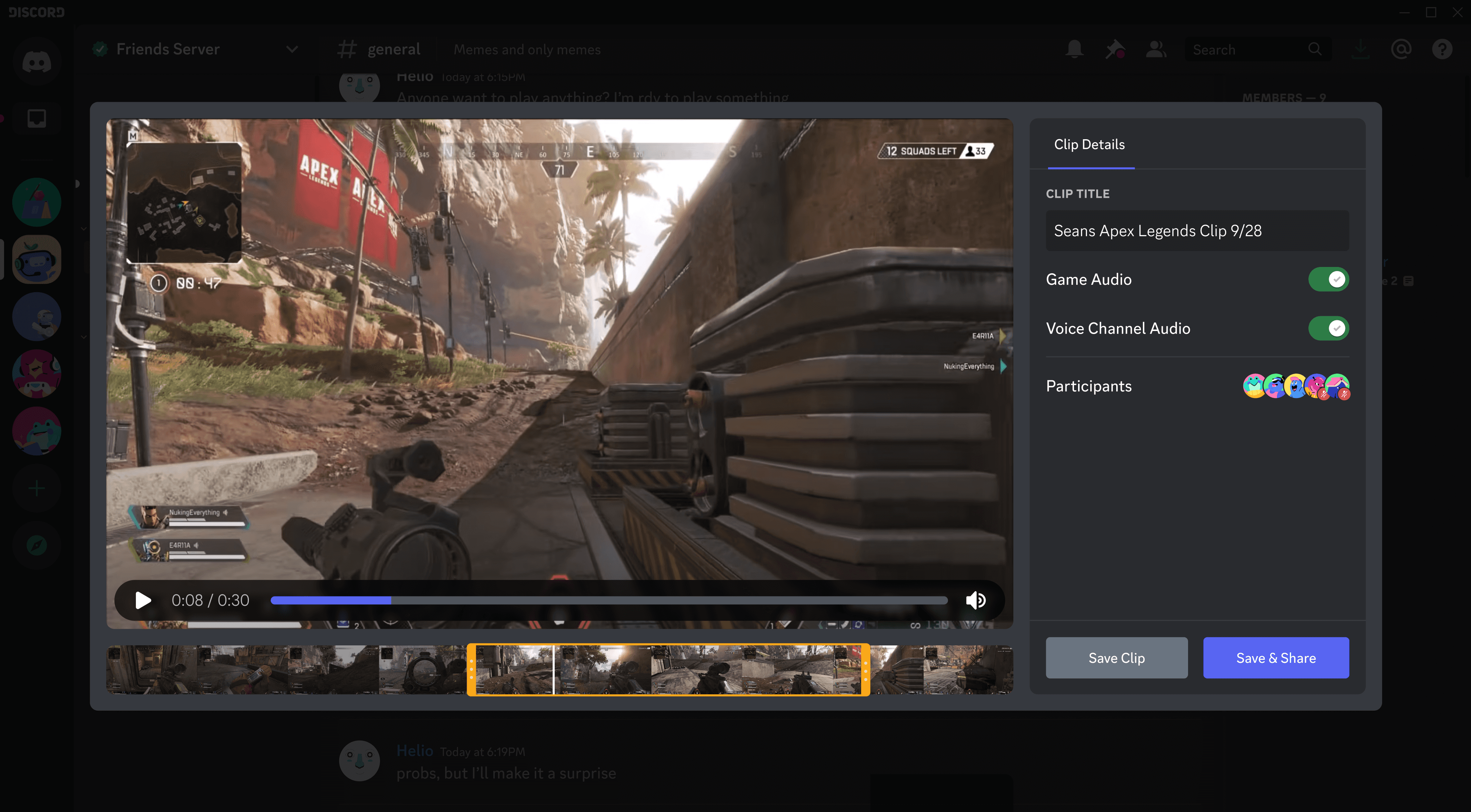
Once it shipped, the flow was simple: an empty state in the plus menu introduces the capture shortcut and the option to start from a live stream; the next visit shows a red notifier on any unedited clip; opening it lets you trim length and add a title, then Save and Share rather than just Save, since most people shared anyway and I wanted that intent built into the primary action. Sharing posts the clip straight into a channel or DM — and because Discord generates and uploads that file on the user's behalf rather than the user dragging a raw file in, it's also how the Nitro exemption above actually worked technically.
Before launch, legal review surfaced two requirements I designed to solve rather than around. Anyone could already record a Discord call with third-party tools, but nobody had done it through a native Discord feature before, so we needed explicit disclosure. A toast appears for everyone in a call the moment someone goes live or has clipping enabled, with the option to leave or learn what clipping does. Separately, Discord's console partnerships came with their own constraints. Xbox specifically did not want us capturing Xbox voice audio, even though it ran through Discord like everything else. I accommodated this restriction with a small UI state showing their voice won't be included in the clip when capturing audio.
Outcomes
Clipping shipped and earned continued investment at Discord beyond my time at the company. I don't have adoption numbers to point to — the layoff that took out most of the Gaming squad landed before we saw results come in. What I do have is what friends still on different Discord teams have told me since: it's been well received with continued investment and is a key pillar of Discord's gaming umbrella.
Reflection
An easy win would have been shipping Clipping as a Nitro only feature and getting a "quick" monetization win out of it. I made the case to the monetization team and our CTO directly that this was worth more than a Nitro upsell. This was a big bet but it paid off and encouraged me to continue to take big swings during my time at Discord and beyond.